Search This Blog

Showing posts with label shp2pgsql. Show all posts

Tuesday, September 29, 2015

Re-projecting shapefile data during load in PostGIS

I recently came across the need to load data into PostGIS from Shape files. However, some data was in one projection and other data was in a different projection system. I needed to re-project the data at the time of loading the data.

The process is fairly straightforward. The syntax is

shp2pgsql -s :

Here is an example using real data..

Let's look at the data

gdalsrsinfo nybbwi.prj


As we can see, the projection is NAD_1983_StatePlane_New_York_Long_Island_FIPS_3104_Feet, whose EPSG code is 2263. Since, I would like to load the data, I can use shp2pgsql command to create the load file.

shp2pgsql -d -s 2263 -g geom -e -I nybbwi nystaging.boroughs > $scriptdir/021_boroughs.sql

The next file was in a different projection. Here I am using a different command ogrInfo to get the projection information.

ogrinfo -al -so fatality_yearly.shp

This reveals that projection is latlong, or EPSG code 4326


As explained previously, we can use the -s option to re-project the data. The following is the command

shp2pgsql -d -s 4326:2263 -g geom -e -I fatality_yearly nystaging.fatality > $scriptdir/023_fatality_yearly.sql

shp2pgsql -d -s 4326:2263 -g geom -e -I injury_yearly nystaging.injury > $scriptdir/024_injury_yearly.sql


That's it...

Here is the complete script...

# 04_load_spatial_nyc_data.sh

export datadir=../data/shpfiles
export scriptdir=../../scripts

export curdir=~/Work/Transportation/NYC/scripts
cd $curdir

export PGUSER=nyc
export PGPASSWORD=nyc
export PGDATABASE=nyc


echo $datadir
echo $scriptdir

cd $datadir

gdalsrsinfo nybbwi.prj
# EPSG code for NAD_1983_StatePlane_New_York_Long_Island_FIPS_3104_Feet is 2263
shp2pgsql -d -s 2263 -g geom -e -I nybbwi nystaging.boroughs > $scriptdir/021_boroughs.sql

gdalsrsinfo PedCountLocationsMay2015.prj
ogrinfo -al -so PedCountLocationsMay2015.shp
shp2pgsql -d -s 2263 -g geom -e -I PedCountLocationsMay2015 nystaging.pedcounts > $scriptdir/022_pedcounts.sql

ogrinfo -al -so fatality_yearly.shp
shp2pgsql -d -s 4326:2263 -g geom -e -I fatality_yearly nystaging.fatality > $scriptdir/023_fatality_yearly.sql
shp2pgsql -d -s 4326:2263 -g geom -e -I injury_yearly nystaging.injury > $scriptdir/024_injury_yearly.sql

cd $scriptdir

psql -f 021_boroughs.sql
psql -f 022_pedcounts.sql
psql -f 023_fatality_yearly.sql
psql -f 024_injury_yearly.sql


Monday, May 13, 2013

Adding an executable to PATH on Ubuntu


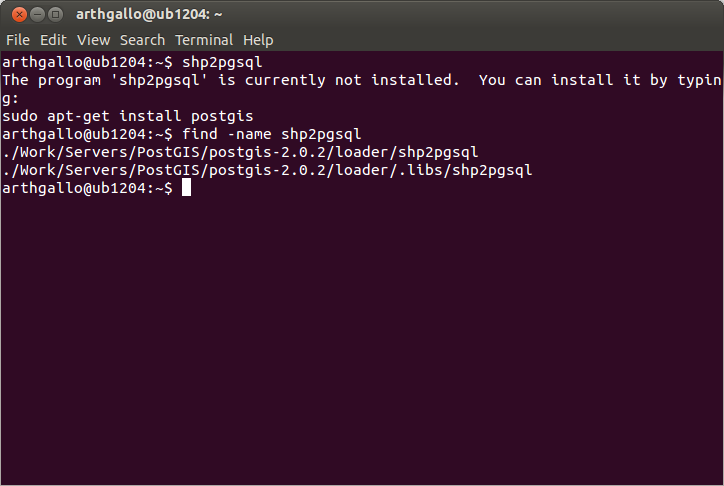
I needed to run the shp2pgsql command on my machine, for loading certain shape files I had downloaded from NYC GIS data clearing house, into a PostGIS instance. As I ran the shp2pgsql file to remind myself of the input parameters, I got the following error, essentially saying that PostGIS was not installed. This was incorrect, as I had recently installed PostGIS as documented in my previous posts here and fixed some environment issues here.

$shp2pgsql
The program 'shp2pgsql' is currently not installed. You can install it by typing:
sudo apt-get install postgis


Clearly, an issue with my path. I issued a find command to look for the actual installation folder.

$ find -name shp2pgsql

This located the file in its correct location.


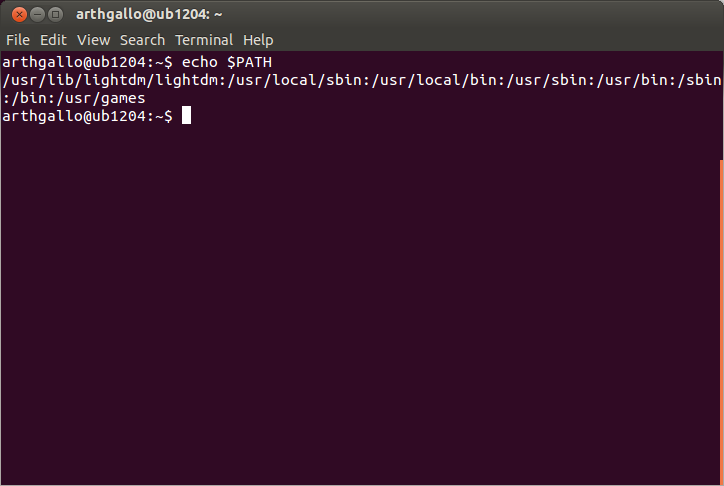
Now, I checked my path.

$ echo $PATH

This showed that the shp2pgsql folder was definitely not in my path.


To add shp2pgsql to my path, I had to edit the .bashrc on my machine with the following command.

$ gedit ~/.bashrc


In the file, I added the an entry for appending the path to the executable to the existing system path variable.

PATH=$PATH:~/Work/Servers/PostGIS/postgis-2.0.2/loader
export PATH


Now I saved the file and closed it, and issued the following command on the terminal window, to reload the updated bashrc file into the environment.

$ source ~/.bashrc


Issuing the echo PATH command displayed the updated path, as shown below.


Now entering the shp2pgsql command displays the options for the tool.


Now we can go back to running the shp2pgsql command. This post walks through an example of loading some GIS data into PostGIS using the given command.